
Pulse 2.0.32: Custom Continuous Integration Trend Reports
I’ve just released another Pulse 2.0 build, and the new features are still coming :). In this case, I have added the long-anticipated ability to capture custom metrics with your build results, then report trends for these metrics over time. You can capture any benchmark of your build that you can imagine, then have Pulse chart it for you. All sorts of charts are supported, with flexible configuration.
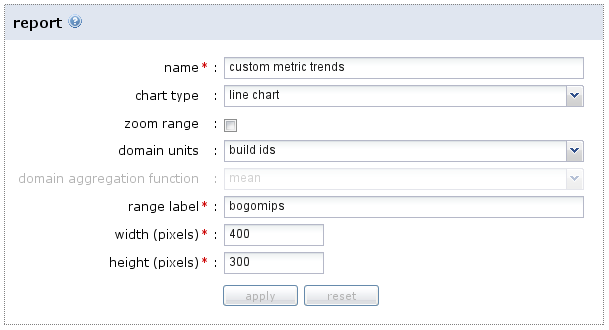
As an example, imagine capturing some simple performance measures as numbers. You can then configure Pulse to show them in a line chart:
Pulse stores the metric values with each build, so you can easily see how performance is changing over time:
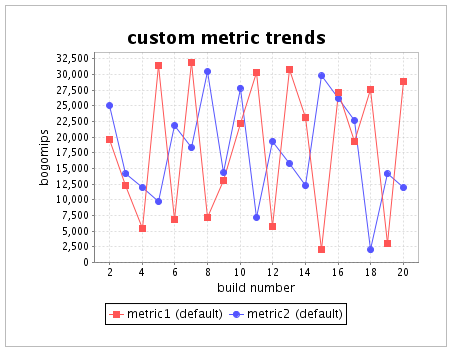
Most importantly, if performance drops, it is easily visible exactly when it happened, making it much easier to figure out why. You can learn more about how to configure custom reports in the Cookbook.
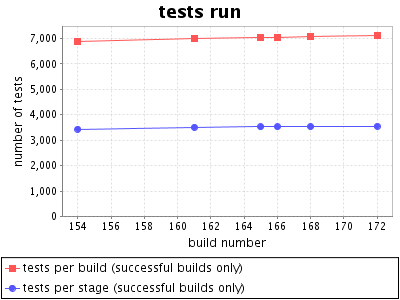
As part of this change, I also tweaked the default reports that Pulse generates for you. Now all of these reports are configured in the same way as the custom ones above, allowing you to change them to suit your preference. Not only that, but more reports come “out of the box”:
Sweet! Interested in continuous monitoring of your project’s performance? Try Pulse 2.0 today with a free small team, open source or evaluation license.

This entry was posted on Thursday, June 11th, 2009 at 10:20 am and is filed under Agile, Build, Continuous Integration, Technology, Zutubi. You can follow any responses to this entry through the RSS 2.0 feed. You can leave a response, or trackback from your own site.

